Vertical GPU mounts have become a popular upgrade for PC builders seeking a striking look without sacrificing performance. This guide examines top vertical GPU mounting options that pair well with modern PCIe 4.0/5.0 components, offering solid cooling, flexible fits for ATX and micro-ATX cases, and adjustable brackets to accommodate a range of GPUs. The selections below emphasize ease of installation, compatibility, and build aesthetics for American gamers and creators.
Summary of selected products:
| Product | Brand | Key Benefit |
|---|---|---|
| Cooler Master Vertical GPU Card Holder Kit V3 White | Cooler Master | Removable M-ATX bracket; sleek white finish |
| Cooler Master MasterAccessory Vertical GPU Card Holder Kit V3 Black | Cooler Master | Premium PCIe 4.0 riser; versatile case compatibility |
| EZDIY-FAB Vertical PCIe 4.0 GPU Mount Graphic Card Bracket | EZDIY-FAB | Stretchable design; easy cable access |
| EZDIY-FAB Vertical PCIe 4.0 GPU Mount Bracket with ARGB LED | EZDIY-FAB | ARGB integration; sturdy, quiet operation |
| XRIKUI Vertical GPU Mount for PC Case | XRIKUI | Aluminum construction; adjustable arm |
Cooler Master Vertical GPU Card Holder Kit V3 White

The Cooler Master White V3 kit provides a PCIe 4.0 riser solution compatible with modern motherboards and GPUs, enabling a visually striking vertical mount. Its design supports 3-slot GPUs and fits most traditional ATX cases, with an optional removable M-ATX bracket for Micro-ATX builds. Note: rear fan clearance may be affected in some chassis configurations. This kit emphasizes seamless performance for gaming or content creation when paired with PCIe 4.0/5.0 components.
Key features include a reliable PCIe 4.0 riser cable that maintains compatibility with high-bandwidth GPUs. The white finish adds a premium look that complements many builds, especially those with RGB lighting or a light-themed aesthetic. For those prioritizing clean cable management and a minimalist look, this kit provides a straightforward installation path with strong structural support.
Compared to other vertical mounts, this option emphasizes broad compatibility across ATX and Micro-ATX cases, while offering a modular approach through the removable bracket. Users should be mindful of potential obstruction to a rear exhaust fan in certain layouts, so checking your case clearance beforehand is advised.
Cooler Master MasterAccessory Vertical GPU Card Holder Kit V3 Black

The Black V3 kit from Cooler Master emphasizes a premium PCIe 4.0 riser cable designed for compatibility with both PCIe 4.0 and 5.0 GPUs. It fits standard ATX cases and handles modern 3-slot GPUs, while the removable M-ATX bracket accommodates 4-slot Micro-ATX builds. As with similar kits, rear fan clearance is case-dependent, so plan your airflow and mounting position accordingly. This kit is ideal for users seeking a sleek, dark aesthetic with robust compatibility.
The inclusion of a quality riser cable helps minimize signal integrity issues and ensures stable performance in gaming or productivity workloads. The kit’s adaptability across multiple motherboard and case sizes makes it a solid all-around choice for DIY enthusiasts looking to showcase their GPU without major visual compromises.
Keep in mind that some cases with tight rear-panel space may require alternative mounting positions or fan adjustments. If you want a uniform black look that blends with most builds, this option is a reliable pick.
EZDIY-FAB Vertical PCIe 4.0 GPU Mount Graphic Card Bracket

This EZDIY-FAB kit highlights a white, vertical GPU mount with a 90-degree right-angle PCIe 4.0 X16 Gen4 riser cable. It supports most 1, 2, and 3-slot cards and is designed for ATX towers with at least seven PCI slots. A stretchable structure and a robust metal finish help ensure stability while displaying the GPU prominently. The design also facilitates easy HDMI/DP cable access when connected to the card, reducing cable clutter behind the motherboard tray.
Installation is straightforward, with emphasis on case compatibility and rear clearance. Users should verify that their case supports the seven-slot PCIe configuration and that there is adequate space behind the motherboard tray for the riser cable routing. This option is well-suited for builders who want a clean, high-visibility GPU presentation with minimal compatibility concerns.
EZDIY-FAB Vertical PCIe 4.0 GPU Mount Bracket with ARGB LED

This EZDIY-FAB ARGB-equipped vertical mount adds a lighting accent to the GPU display, combining a sturdy black frame with a 5V ARGB module. It supports 1- to 3-slot GPUs and requires a full or mid-tower chassis with seven PCIe slots. The included high-quality riser cable is designed for PCIe 4.0 X16 Gen4, providing reliable bandwidth for RTX 30- and 40-series GPUs and AMD equivalents.
The ARGB integration enables synchronized lighting with other RGB components, which is a key consideration for gamers seeking an immersive aesthetic. The bracket construction emphasizes rigidity and weight support, helping to minimize wobble or sag. Potential buyers should confirm ARGB control compatibility with their motherboard software or external controller to ensure full synchronization.
XRIKUI Vertical GPU Mount for PC Case
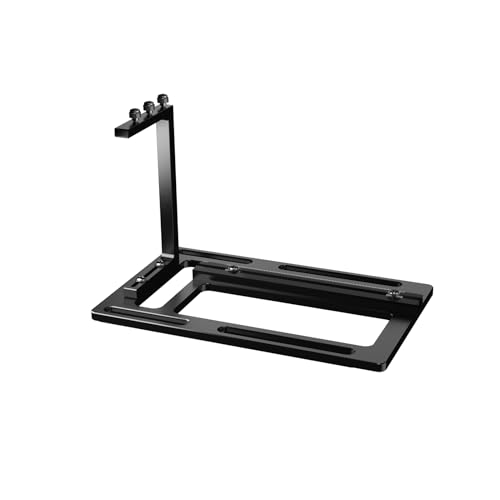
The XRIKUI vertical mount uses CNC-machined aluminum for a rigid, lightweight support solution. Its adjustable GPU support arm accommodates a wide range of card sizes, making it suitable for custom builds or upgrades that require precise alignment and stability. The bracket includes a PCIe riser slot with flexible mounting positions to match various case layouts and cooling strategies.
Aluminum construction provides a premium feel and durability, while the multi-position arm ensures compatibility with different GPU thicknesses and internal layouts. Builders should assess their case clearance and airflow plan since vertical mounting can affect rear-panel clearance and exhaust paths in compact cases. This option appeals to users seeking a durable, modular bracket with precise alignment capabilities.
Oddtone GPU Support Bracket, Adjustable Height

The Oddtone GPU Support Bracket emphasizes all-aluminum durability and an adjustable height design for stable vertical mounting. It includes a magnetic bottom and non-slip sheet for secure, tool-free setup across various chassis types, including traditional and extended PSUs. This option focuses on preventing GPU sag while maintaining a clean aesthetic and straightforward installation process.
Users should consider compatibility with their specific case and power supply layout, as the bracket’s magnetized base requires a metal surface for secure placement. The adjustable height feature supports different GPU lengths, providing flexibility for future GPU upgrades or multi-GPU configurations. Overall, the Oddtone bracket offers a robust solution for reliable vertical display with ease of use.
EZDIY-FAB PCIe 4.0 GPU Mount Bracket Multi-Angle

This EZDIY-FAB multi-angle mount enables vertical or angled GPU display with 0 to 45-degree tilt. It’s designed for full/mid-tower cases with at least seven PCIe slots and supports PCIe 4.0/3.0/2.0/1.0 interfaces. The magnetized base improves stability on the PSU shroud, while the included Gen4 riser cable ensures compatibility with RTX 30/40 series and RX 6800/6900 series GPUs. The adjustable angle can help balance airflow and cable routing in complex builds.
For builders seeking a customizable display angle to optimize visibility or airflow, this option provides flexible mounting. It is important to verify that the chosen angle still permits proper air intake and exhaust within the case, especially in smaller enclosures. The mount’s versatility makes it suitable for gamers and content creators who want aesthetically pleasing, adjustable GPU presentation.
Buying Guide: Key Considerations for Vertical GPU Mounts
- Case compatibility: Check the number of PCIe slots, rear fan clearance, and available mounting points. Some kits require seven PCIe slots or more for a secure install.
- Riser cable quality: Look for PCIe 4.0/5.0 compatibility with a robust, shielded riser cable to maintain signal integrity for high-end GPUs.
- Bracket material and build: Aluminum or other rigid metals reduce sag and wobble. Consider weight and ease of installation when choosing a kit.
- Modularity and adaptivity: Removable M-ATX brackets and adjustable arms suit ATX, Micro-ATX, and E-ATX builds, expanding compatibility across cases.
- Aesthetics and lighting: ARGB integrations and finish color (black, white) help match chassis themes and RGB ecosystems.
- Airflow considerations: Vertical mounting can affect rear airflow. Plan fan placement and ensure the GPU does not block exhaust paths.
- Ease of installation: Some kits offer magnetic bases or easy-click mounting. Ensure compatibility with your motherboard tray, PSU shroud, and cable routing.
- Future-proofing: If you plan to upgrade GPUs, choose a bracket with adjustable arms and broad size support to accommodate thicker cards.
- Warranty and support: Prefer brands with solid support for installation questions and compatibility concerns.
Overall, the options reviewed here balance performance and aesthetics. When choosing a vertical GPU mount, prioritize case compatibility, riser cable quality, and the level of adjustability you need for your build. A well-chosen mount can elevate your PC’s appearance while preserving airflow and performance across gaming and creative workloads.