Finding a plug-and-play camera that delivers sharp video, clear audio, and hassle-free setup is essential for work, learning, and streaming. The following selections focus on USB webcams and conference cams that require little to no configuration. Each option emphasizes reliability, ease of use, and solid image quality to fit a range of environments—from home offices to small meeting rooms.
| Product | Key Benefit | Angle / FOV | Notable Feature |
|---|---|---|---|
| Shcngqio 1080P HD Webcam | Wide-angle for group calls | Wide-Angle | Noise-cancelling mic, auto light correction |
| NexiGo N60 | Software-adjustable FOV | Up to 110° | Plug-and-play, privacy cover |
| EMEET C960 | Dual mics for clear voice | 90° | Privacy cover, low-light boost |
| EMEET 1080P Webcam | Strong low-light performance | ~90° | AI noise-canceling microphones |
| Owl Labs Meeting Owl 3 | 360° room capture | 360° video, 18 ft mic pickup | Speaker-tracking intelligence |
Below are five plug-and-play cameras chosen for their balance of ease of use, video quality, and practical features. Each product section provides a concise overview, key specifications, and practical considerations to help you compare options quickly.
Shcngqio 1080P HD Webcam With Microphone

The Shcngqio TWC29 camera delivers 1080p full HD clarity with a wide-angle lens, making it suitable for group calls, streaming, and online teaching. At 30 frames per second, visuals stay smooth, and colors remain vivid. A built-in noise-reducing microphone helps keep your voice clear in busy environments, while automatic light correction adapts to varying lighting to improve image quality. This plug-and-play USB webcam is designed for compatibility with laptops, desktops, and most conferencing platforms, simplifying setup across devices.
Considerations: The wide-angle view is beneficial for capturing multiple participants, but it may introduce some edge distortion at extreme angles. The microphone quality is solid for typical home or small office use, though high-end studio settings may benefit from a dedicated audio solution. Its privacy cover adds a layer of security when not in use, a practical feature for shared spaces.
NexiGo N60 1080P Webcam

The NexiGo N60 offers a crisp 1080p image with a wide, adjustable field of view. Its fixed focal length lens provides reliable clarity at standard distances, and the software allows you to tweak exposure and FOV for your space. A built-in noise-canceling microphone reduces ambient background sound, making it well-suited for video calls, virtual meetings, and livestreams. The camera is straightforward to set up—plug in the USB cable, install optional software, and you’re ready to go.
Important notes: The N60’s wider FOV can capture more of your environment, which is ideal for presentations or collaborative sessions. Software control enables fine-tuning but may require a quick setup process for first-time users. Privacy cover adds a practical layer of privacy during non-use moments.
EMEET C960 Webcam With Privacy Cover
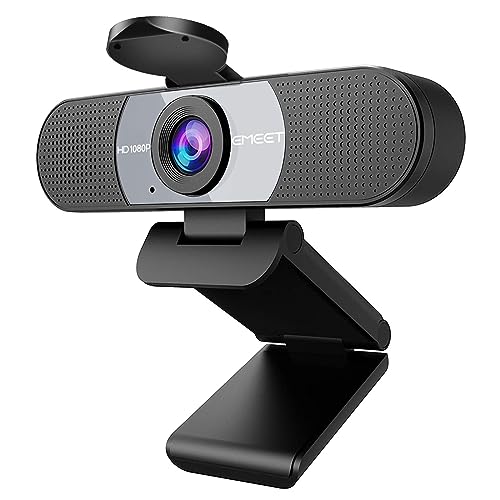
EMEET’s C960 offers a pair of noise-reducing microphones and a 90-degree field of view for focused framing. This camera emphasizes low-light performance with automatic exposure and color adjustment, helping you look clear even in challenging lighting. A built-in privacy cover protects your lens when not in use, and the plug-and-play design makes setup quick for both laptops and desktops.
Considerations: The dual-mic setup enhances voice capture for calls but may pick up room noise in very busy spaces. The 90° FOV is suitable for single-presenter setups or desk-level interviews but may feel tighter for larger groups. The automatic light adjustment is a practical feature for fluctuating lighting conditions.
Edew 1080P Webcam With Wide View

Edew’s 1080p webcam focuses on delivering strong low-light performance and automatic light correction to maintain clarity in dim environments. The camera supports plug-and-play USB connectivity and includes AI-based noise reduction microphones for cleaner audio during calls, streams, or recordings. This makes it a versatile choice for remote work, online classes, and casual production.
Tips: The AI noise reduction helps in spaces with moderate background noise, but for very quiet environments, enabling the mic optimization in the software can yield the best results. The auto light correction helps you stay visible across different rooms and times of day.
Owl Labs Meeting Owl 3

The Meeting Owl 3 is a 360-degree conference camera designed for larger rooms and hybrid meetings. It captures panoramic video in 1080p and streams 360-degree audio up to 18 feet, automatically focusing on the active speaker to foster engagement in meetings. It’s a plug-and-play USB device that integrates with major platforms, and Owl intelligence helps automate camera and mic focus for a contributing, hands-free experience in collaborative environments.
Considerations: This device targets meeting rooms and teams rather than individual desk setups. While it simplifies group collaboration, space requirements and room acoustics play a larger role in performance. Availability of administrative tools can help manage fleets of devices across an office.
Buying Guide: Key Purchase Considerations
- Image quality and resolution
- Look for cameras offering at least 1080p resolution for sharp video. Some models provide enhanced low-light performance or HDR-like adjustments to keep you visible in varied lighting.
- Field of view (FOV)
- A wider FOV captures more of the scene, which is useful for group calls or demonstrations. Narrower FOVs can reduce edge distortion for a single presenter.
- Microphone quality
- Built-in mics with multiple noise-reduction modes improve voice clarity in busy environments. Some cameras offer dual or omnidirectional mics for broader pickup.
- Privacy and security features
- Privacy covers or physical shutters help maintain control over when the camera is active. Consider devices that support quick disablement.
- Plug-and-play and software control
- USB plug-and-play is ideal for quick setup. Software controls let you adjust exposure, white balance, and zoom, but should not complicate the experience.
- Platform compatibility
- Ensure compatibility with your preferred conferencing tools (Zoom, Teams, Skype, YouTube Live, etc.). Cross-platform support reduces setup friction.
- Room size and use case
- For personal desks, a compact webcam might be best. For conference rooms, consider 360-degree cameras or models with flexible mounting options and wider coverage.
In choosing a plug-and-play camera, balance image and audio quality with ease of use. If you frequently host meetings with multiple participants in a single space, a 360-degree solution like the Meeting Owl 3 may be most effective. For individual work or streaming at a desk, compact webcams with strong low-light handling and privacy features offer practical versatility.