Finding the right gimbal can dramatically elevate your video quality, whether you’re capturing smartphone vlogs, DSLR-style footage, or hybrid camera setups. This guide highlights five top gimbals that balance stabilization, usability, and versatility for American creators. Each option supports smooth movement, tracking tech, and convenient control, helping you produce polished videos for YouTube, TikTok, and more.
Summary of Selected Products
| Product | Brand | Key Strength |
|---|---|---|
| DJI RS 3 Mini | DJI | High payload, travel-friendly, native vertical shooting |
| DJI Osmo Mobile SE | DJI | Compact, magnetic clamp, ActiveTrack 6.0 |
| DJI Osmo Mobile 7 | DJI | Built-in features, One-Tap Edit, extended tracking |
| DJI Osmo Mobile 6 | DJI | ActiveTrack 6.0, remote watch control |
| FeiyuTech SCORP-C2 | FeiyuTech | AI tracking, no app required, strong payload |
DJI Osmo Mobile SE: Compact 3-Axis Gimbal

DJI’s Osmo Mobile SE offers a foldable, magnetically quick gimbal designed for on-the-go shooting. Its ActiveTrack 6.0 system keeps subjects in frame with improved tracking for kids, pets, and yourself. A magnetic clamp enables fast setup between shots, and a watch-based remote control (via the Mimo app) lets you adjust angles and start recording from your wrist. This model emphasizes portability without sacrificing stabilization, making it ideal for travel vlogs and quick social clips.
DJI RS 3 Mini: Lightweight 3-Axis Stabilizer
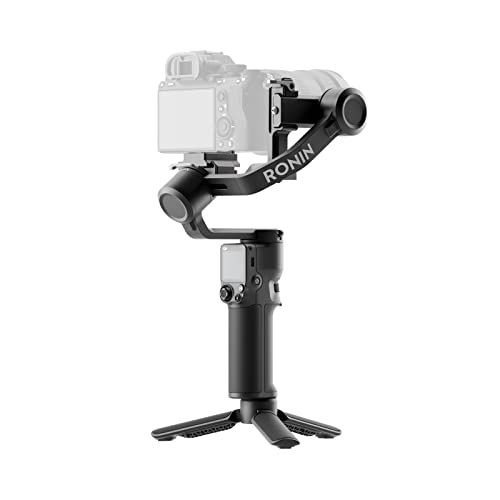
The RS 3 Mini is a compact stabilizer tailored for cameras and heavier setups up to 2 kg (4.4 lbs). It weighs about 795 g (1.75 lbs), making it highly portable for travel shoots. Its robust motors support a wide range of camera and lens configurations, with Bluetooth shutter control to simplify capture. The gimbal’s compact form does not compromise stability, making it a strong choice for on-the-move video crews and serious hobbyists alike.
DJI Osmo Mobile 7P: Pro-Level Phone Gimbal

The Osmo Mobile 7P combines a robust 3-axis stabilization system with a built-in extension rod and tripod, enabling longer runs and more flexible shooting angles. It integrates quick-launch features, One-Tap Edit, and ShotGuides through DJI Mimo, helping creators plan and execute clips efficiently. The included lighting and mic integration options streamline low-light, on-the-go production, while ActiveTrack 7.0 broadens subject tracking across scenarios.
DJI Osmo Mobile 6: Smoothness On The Move

Osmo Mobile 6 emphasizes ActiveTrack 6.0 tracking and watch control for a hands-free workflow. The 3-axis stabilization delivers silky footage during dynamic shoots, and the built-in remote capabilities allow control without reaching for the phone. Its foldable design and extended operation enhance field usability, making it a reliable solution for daily creators who want steady, professional-looking results.
FeiyuTech SCORP-C2: Built-In AI Tracking

FeiyuTech SCORP-C2 is a DSLR/Mirrorless gimbal with a built-in AI tracking module and up to 3.5 kg payload. It supports native vertical shooting and offers gesture recognition without relying on a separate app, expanding use cases for creators working with heavier cameras. This model is particularly suitable for professionals who need reliable tracking with larger lenses and bodies, along with straightforward vertical-to-horizontal switching.
Buying Guide: Key Purchase Considerations
- Payload and camera compatibility: Assess your typical setup—phone gimbals favor light builds, while DSLR/mirrorless gimbals require higher payload ratings. A higher capacity offers flexibility with lenses and accessories.
- Stabilization technology: Look for models with 3-axis stabilization and advanced motors for smoother footage. Tracking features like ActiveTrack or AI tracking improve subject framing in dynamic environments.
- Portability vs. features: Travel-focused gimbals prioritize compactness and light weight; models with built-in tripods, extension rods, and lighting systems suit creators who film in varied locations.
- Control interfaces: Remote controls (watch-based or app-based) can simplify operation during shoots. Consider how easy it is to start/stop recording, pan/tilt, and adjust exposure on the fly.
- Vertical shooting and workflows: If you produce vertical social content, ensure the gimbal supports native vertical shooting or simple orientation switching.
- Ease of setup and accessories: Magnetic clamps, quick-release plates, and integrated tripods speed up setup times. Assess the availability of compatible accessories for future needs.
- Software integration: Some gimbals pair with companion apps offering editing tools, templates, and guided shooting modes. This can speed up post-production and improve storytelling.
- Budget vs. value: Higher-end models provide more robust stabilization and professional features, but entry-level or mid-range gimbals can deliver solid results for hobbyists and content creators on a budget.
When choosing a gimbal, align your selection with your primary use cases—travel vlogging, studio-style shoots, or hybrid setups with heavier cameras. If you expect to shoot on the go with a phone, prioritize compact designs, reliable tracking, and quick setup. For heavier cameras, focus on payload capacity, motor torque, and compatibility with your lenses. A balanced approach is to prioritize stability and ease of use, then expand with accessories as your production demands grow.