The following article highlights budget-friendly gimbals suitable for smartphones and compact cameras. Each pick balances price with stabilization quality, making it easier to capture smooth video on a tight budget. Below you’ll find concise product sections, a quick comparison, and a buying guide to help you choose the right model for travel, vlogging, or everyday use.
Product Snapshot
| Product | Brand | Type | Approx. Use |
|---|---|---|---|
| DJI Osmo Mobile SE | DJI | Phone Gimbal | Entry to mid-level smartphone stabilization |
| DJI Osmo Mobile 7P | DJI | Phone Gimbal | Latest AI tracking with extended features |
| DJI Osmo Mobile 6 | DJI | Phone Gimbal | 3-axis stabilization with built-in extension |
| hohem iSteady X3 SE | hohem | Phone Gimbal | Detachable remote, foldable, portable |
| SelfieShow Smartphone Gimbal | SelfieShow | Phone Gimbal | All-in-one stabilizer with remote control |
Notes: The five options above emphasize portability, ease of use, and reliable stabilization at a lower price point. Each has unique strengths, from advanced tracking to built-in tripods and detachable remotes, making them suitable for beginners and casual creators alike.
DJI Osmo Mobile SE Gimbal For Smartphones

The Osmo Mobile SE is a compact, foldable gimbal designed for both iPhone and Android devices. It features a magnetically quick snap-in clamp for fast setup, making it easy to grab moments on the go. ActiveTrack 6.0 helps keep moving subjects in frame, whether you’re filming kids, pets, or yourself. A built-in tripod offers hands-free shooting when you want to stabilize on a surface or create time-lapse sequences. Additionally, the remote control via Apple Watch capability transforms the device into a smart, on-wrist controller for changing angles and capturing photos or videos without touching the phone.
What to expect in terms of usage: portability, strong subject tracking, and intuitive controls. The SE’s balance of features makes it a popular choice for vloggers who need reliable stabilization without a high price tag. It’s suitable for short-form content on platforms like YouTube Shorts and TikTok, or travel videos when a lightweight stabilizer is preferable to a full-size rig.
Pros:
– Lightweight and compact for travel.
– Magnetic clamp simplifies attachment/removal.
– ActiveTrack 6.0 for smooth subject following.
– Apple Watch remote adds convenience.
Cons:
– Fewer professional controls than higher-end models.
– Longer, heavy shoots may require occasional rebalancing.
DJI Osmo Mobile 7Gimbal Stabilizer

Osmo Mobile 7 introduces enhanced stability with a robust 3-axis gimbal and integrated features designed to streamline creative workflows. The built-in tripod folds into the frame, reducing clutter when you’re shooting solo. ActiveTrack 7.0 improves subject tracking across more scenarios, while One-Tap Edit helps you quickly move from capture to polished clips. With extended battery life and a compact form, the 7 series remains a practical option for creators who want cinema-quality stabilization without professional gear prices.
Key considerations: the 7Gimbal is ideal for creators who value seamless tracking, quick edits, and convenient, all-in-one design. It’s well-suited for vlogs, travel diaries, and social media where you want reliable tracking without a heavy rig.
DJI Osmo Mobile 6 Gimbal Stabilizer

The Osmo Mobile 6 emphasizes ActiveTrack 6.0, ensuring subjects stay in frame with upgraded tracking performance. A built-in extension rod adds shooting versatility, enabling higher angles or a more dynamic perspective. The Mimo app integration supports remote viewing and control that helps you manage shots more efficiently from your wrist via a connected smartwatch. The combination of tracking accuracy and optional extension makes the 6 a flexible option for those who want a more capable phone gimbal without breaking the bank.
Considerations: compare the added extension rod against how you shoot (hands-on vs. tripod shots), and note that the platform benefits from the Mimo ecosystem for firmware updates and ShotGuides. It’s an attractive pick for travel filmmakers and social media creators looking for dependable stabilization at budget-friendly pricing.
hohem iSteady X3 SE Gimbal

The iSteady X3 SE stands out with a detachable remote control, allowing you to capture selfies and videos from up to about 32 feet away. It incorporates upgraded 3-axis stabilization and a foldable, pocket-sized design that’s ideal for travelers. The detachable remote is especially useful for group shots or when you’re filming yourself in dynamic environments where you can’t easily reach the phone. This model balances portability with practical control features that appeal to budget-conscious buyers who still want solid stabilization.
Strengths: portable, foldable, and capable of remote operation, which broadens your shot possibilities without adding bulk. The X3 SE is a solid pick for on-the-go shooting, vlogging in public spaces, or recording family moments while traveling.
SelfieShow Smartphone Gimbal Stabilizer With Remote
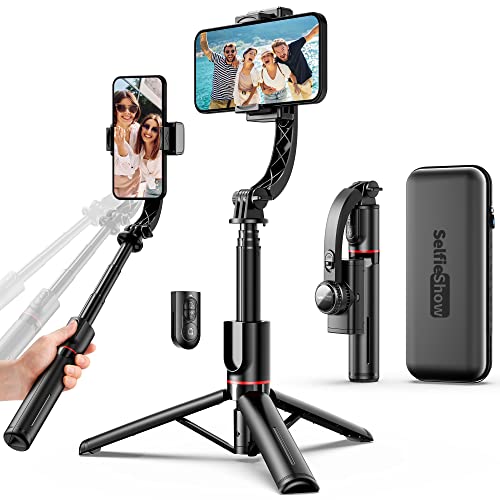
The SelfieShow stabilizer emphasizes a high-performance anti-shake system powered by a brushless motor, delivering smoother video without requiring app-based stabilization. The 360-degree rotatable phone holder supports horizontal or vertical shooting, enabling flexible framing. An integrated compact selfie stick and tripod add convenience for portrait filming or stable tabletop footage. The foldable, lightweight design makes it a practical option for everyday carry and occasional travel shoots where you want simple, reliable stabilization with minimal setup.
Strengths: straightforward operation, flexible rotation, and integrated tripod and stick features that reduce the number of separate accessories you need to carry. It is a strong budget choice for those who want essential stabilization plus practical shooting options without extra hassle.
Buying Guide: Key Considerations When Choosing a Cheap Gimbal
- Intended use and device compatibility: Confirm whether the gimbal supports your phone model and size. Some models have tighter clamps or specific weight limits.
- Stabilization performance: Look for 3-axis stabilization as a baseline. For fast-moving subjects, higher-level tracking and faster response times help keep frames steady.
- Tracking and intelligent features: ActiveTrack or similar subject-tracking tech can reduce post-production time. Consider if you need face/subject tracking, gesture control, or automatic shot modes.
- Portability and build: Foldable designs save space for travel. Lightweight models are easier to carry but may have fewer features or shorter battery life.
- Battery life and charging: Longer runtimes are beneficial for extended shoots. Check whether the gimbal supports pass-through charging or charging while using the phone.
- Remote control options: Detachable remotes or watch-compatible controls can add flexibility for solo creators, travelers, and vloggers.
- Accessories and expandability: Built-in tripods, extension rods, and remote controls reduce the number of separate accessories you’ll need.
- App integration and software support: A well-supported companion app can offer shooting presets, editing tools, and firmware updates that enhance performance over time.
- Price-to-performance balance: Compare stabilization quality, tracking accuracy, and convenience features across models within your budget to maximize value.
Overall, budget-friendly gimbals offer compelling stabilization for casual creators and travelers. When choosing, align features with your typical shooting scenarios—urban vlogs, travel diaries, or casual social posts—and prioritize models that provide reliable tracking, durability, and portable design within your price range.