Combining a camera with an instant printer lets you capture moments and print them in seconds. This guide highlights five top options that pair smart photography with convenient, portable printing. From retro-style instant cameras to pocketable mini printers, these picks cover iOS and Android compatibility, bleed-resistant prints, and user-friendly editing apps.
Summary of chosen products
| Product | Brand | Format | Key Benefit |
|---|---|---|---|
| KODAK Mini Shot 2 Retro 4PASS | KODAK | 2.1×3.4″ prints | Built-in printer, Bluetooth mobile printing |
| KODAK Step Instant Smartphone Photo Printer (Black) | KODAK | 2×3″ ZINK prints | Zero-ink technology, full editing app |
| Kodak Mini 2 Retro Portable Printer | KODAK | 2.1×3.4″ prints | Compact, Bluetooth connectivity, 4PASS quality |
| Canon Selphy CP1500 Wireless Photo Printer (Black) | Canon | 2×3″ or 4×6″ via dye-sub | Wireless printing, portable option with optional battery |
| Canon Ivy 2 Mini Photo Printer | Canon | Sticky-back ZINK prints | Direct phone printing with Peel & Stick backing |
KODAK Mini Shot 2 Retro 4PASS 2-in-1 Instant Camera And Printer

The KODAK Mini Shot 2 Retro combines a digital camera with a built-in printer, enabling instant photo output right from the device. It supports 2.1×3.4″ prints and can also print photos from a smartphone gallery via Bluetooth. Compatibility spans Apple devices and Android systems, broadening its usability. The 4PASS printing technology delivers high-quality images rapidly, while laminated layers protect prints from fingerprints and water. Kodak emphasizes long-lasting prints—over 100 years under proper conditions.
KODAK Step Instant Smartphone Photo Printer
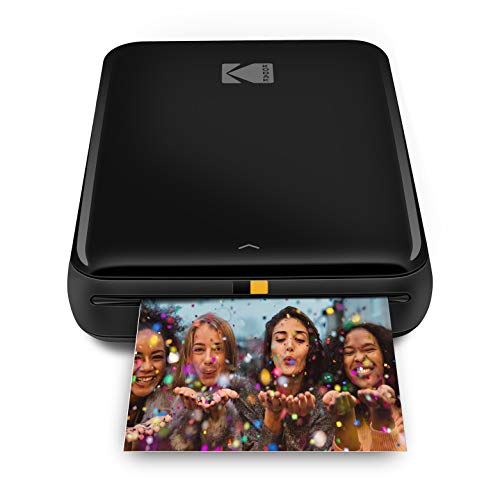
Step up your printing workflow with this pocket-sized printer that connects to iOS and Android devices via Bluetooth or NFC. It uses Zero Ink (ZINK) technology, producing 2×3″ sticky-back photos without ink cartridges. The free Kodak App unlocks editing features to create collages, apply filters, and add borders or stickers before sending images to print in under a minute. Prints are moisture- and tear-resistant, designed for casual sharing and travel use.
Kodak Mini 2 Retro Portable Photo Printer

The Kodak Mini 2 Retro offers a compact, pocket-friendly design with Bluetooth printing. It uses Kodak 4PASS technology to produce vibrant, laminated photos that resist fingerprints and water. The device is easy to pair with Android or iOS devices via the Kodak Photo Printer app, enabling instant printing from your gallery or camera roll. Lightweight portability makes it suitable for classrooms, travel, and everyday moments.
Canon Selphy CP1500 Wireless Compact Photo Printer

The Canon Selphy CP1500 blends a modern, compact design with advanced wireless connectivity. It supports convenient smartphone and computer printing, with the option to add a battery back for true on-the-go use. Photos dry quickly, resist moisture, and maintain color fidelity for long-term display. The CP1500 is versatile for travel, home offices, and classrooms, offering reliable dye-sub printing at compatible sizes.
Canon Ivy 2 Mini Photo Printer

Canon Ivy 2 Mini prints directly from compatible iOS and Android devices using the Canon Mini Print App. It employs Zero Ink (ZINK) technology, embedding dye crystals in the paper to produce vivid, no-ink-needed photos. The sticky-back backing enables easy placement on walls, notebooks, or laptops. It’s a compact option for quick, personalized photo sharing and crafting on the go.
Buying Guide
When choosing a camera with a built-in printer or a portable photo printer, consider these factors:
- Print size and format: 2×3″ and 2.1×3.4″ formats are common; some models offer 4×6″ options. Match your needs for albums, frames, or scrapbooks.
- Printer technology: Dye-sublimation (dye-sub) and 4PASS laminate tech yield durable, water-resistant prints. ZINK (Zero Ink) offers ink-free convenience but may have different finish characteristics.
- Connectivity: Bluetooth or NFC from phones, and compatibility with iOS and Android devices. Some models support direct gallery printing or in-app editing.
- Portability: Size, weight, and optional battery adapters affect on-the-go usability for travel, events, or classrooms.
- Print quality and longevity: Look for lamination or protective coatings, color fidelity, and print longevity (years or decades) under typical conditions.
- App features: Editing tools, collage creation, borders, stickers, and filters can add value before printing.
- Cost per print: Consider the price of paper and any consumables; some bundles include starter sheets for immediate use.
- Versatility: Some units combine a camera with a printer, while others are standalone printers. Choose based on whether you want built-in capture capabilities or a dedicated printer for your phone.
- Durability and water resistance: Laminated or coated prints resist moisture and handling wear, important for travel or kids’ activities.
For users prioritizing social sharing, models with fast print times and easy editing are advantageous. Those seeking archival-grade memories may favor printers with laminated prints and long-lasting color fidelity. Budget-conscious buyers often prefer bundles that reduce per-print costs, while hobbyists may enjoy collage and sticker features available in the companion apps.