For professionals needing crisp 4K video and reliable HDMI output, a dedicated camera with robust connectivity can elevate meetings, lectures, and live streams. This guide highlights five top 4K cameras with HDMI outputs, covering AI tracking, optical zoom, and flexible interface options. Each option offers strong image quality, multiple output modes, and practical features for conference rooms, classrooms, and streaming setups.
Summary table of selected products:
| Product | |||
|---|---|---|---|
| TONGVEO 4K PTZ Conference Room Camera System | TONGVEO | HDMI, USB3.0, LAN | AI auto-tracking, 20x zoom, full duplex speakerphone |
| SVPRO 4K 60fps HDMI Camera | SVPRO | HDMI, USB3.0 | 4K 60fps, 10x optical zoom, versatile lens |
| ELP 4K HDMI USB Camera Wide Angle | ELP | HDMI, USB | 120° wide lens, 4K output, multiple display modes |
| Caupureye Camcorder 4K | Caupureye | HDMI, USB | 4K 48MP, 21x digital zoom, webcam capable |
| lovpo Camcorder 4K Vlogging | lovpo | HDMI, USB | 18x digital zoom, 3.0″ touch screen, dual batteries |
TONGVEO 4K PTZ Conference Room Camera System

The TONGVEO system combines a 4K PTZ camera with an AI-powered auto-tracking feature and a conference Bluetooth speakerphone. Outputs include 4K/30fps video via HDMI, USB3.0, and LAN for IP streaming. Its 20x optical zoom, a 63° wide-angle lens, and stable autofocus are designed for large rooms and live events, with a focus on maintaining the speaker in frame. This all-in-one setup targets professional meetings, worship services, and large-scale seminars.
SVPRO 4K 60fps HDMI Camera

The SVPRO camera delivers Ultra HD 4K at 60fps with HDMI and USB3.0 outputs, supporting real-time streaming and high-quality recording. It features a 1/2.8″ IMX415 sensor and a 5-50mm telephoto lens achieving 10x optical zoom. This model emphasizes flexibility for long-distance shoots and close-ups, making it suitable for corporate presentations, product demos, and educational labs where crisp motion is essential.
Caupureye Camcorder 4K Vlogging

The Caupureye camcorder supports up to 4K video with 48MP photo capability and 21x digital zoom. It can operate as a webcam via USB and outputs through HDMI for TV viewing. The 3.0″ rotatable touchscreen and dual-lens setup (wide and telephoto) offer versatile shooting angles, handy for tutorials, event coverage, and classroom demonstrations.
ELP 4K HDMI USB Camera Wide Angle

This ELP model provides 4K output via HDMI and USB, with a 120-degree wide-angle lens designed to minimize distortion. It supports three display modes—HDMI, USB, or both—and is built to simplify multi-screen setups, making it suitable for classrooms, conference rooms, and home studios needing a broad field of view.
lovpo Camcorder 4K Vlogging
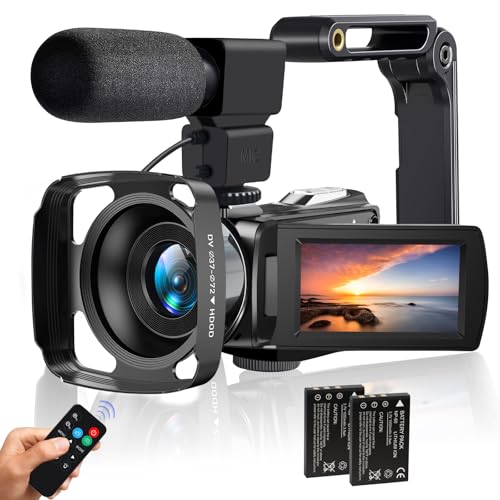
The lovpo camcorder targets creators with UHD 4K footage and an 18x digital zoom, plus a 3.0″ touch screen and built-in microphone. It supports Wi-Fi for live streaming and webcam use, and includes dual batteries for extended shooting sessions. This option suits educators, content creators, and remote presenters who require mobility and reliable HDMI/USB outputs.
Buying Guide
Key purchase considerations when selecting a 4K camera with HDMI output:
- Output formats and interfaces: Confirm HDMI version, USB3.0 availability, LAN/IP streaming, and whether RTSP/RTMP are supported for live broadcasts.
- Image quality and sensors: Look for 4K at 30fps or 60fps, sensor size (1/2.8″ or larger), and low-light performance to ensure clear footage in varying environments.
- Zoom and field of view: Optical zoom and wide-angle lenses determine how much of the scene is captured and how closely subjects can be framed without distortion.
- Autofocus and tracking: AI-based tracking helps keep speakers centered in larger rooms; consider the reliability of humanoid vs. facial recognition for your setting.
- Audio compatibility: If using a conference speakerphone or microphone, verify audio integration, duplex capabilities, and output routing to capture clear sound with video.
- Mounting and form factor: PTZ cameras offer remote pan/tilt control and speed; fixed cams work well for desk setups or podiums. Ensure mounting options fit your space.
- Power and cabling: POE support can simplify installation; otherwise plan for separate power supplies and cable management.
- Portability vs. permanence: Portable camcorders suit classrooms and field use, while PTZ systems fit permanent conference rooms or lecture halls.
- Budget vs. value: Balance camera features (AI tracking, lens quality, output versatility) against total cost including accessories and compatibility with existing systems.
- Software and integration: Check for companion apps, firmware updates, and compatibility with popular video conferencing platforms.
These considerations help compare cameras for meeting rooms, classrooms, live streaming, and remote teaching. Selecting a model with robust HDMI output, reliable autofocus, and flexible connectivity will support consistent, high-quality video across various environments.